



HV-Transformer
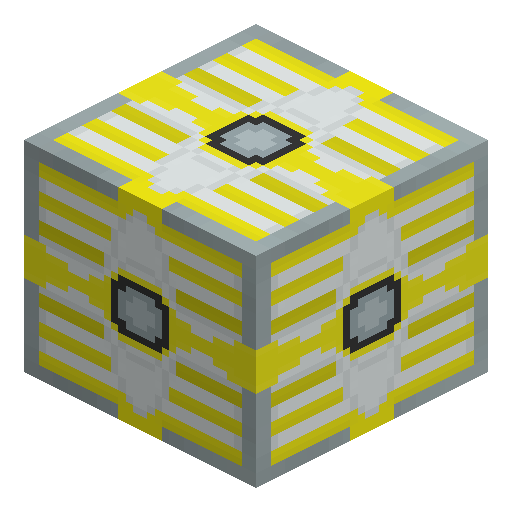
HV-Transformer is a placeable Industrial Craft 2 block that converts EU (the mod's energy unit) between 2048 EU/t and 512 EU/t in both directions.
Description
The GUI offers three modes — Redstone = step-up (the default state), fixed step-down, and fixed step-up — while a wrench right-click reorients the HV-Transformer and a wrench on the five-dot face removes the HV-Transformer. One HV-Transformer forms the core of the EV-Transformer recipe, and the Mass Fabricator recipe places two HV-Transformers flanking an MFE. Setting the mode deliberately keeps 2048 EU/t on the EV side of the grid and 512 EU/t where the remaining machines expect exactly that voltage.
Guide
How to Craft and Set Up the HV-Transformer in Minecraft
-
1
Craft the HV-Transformer
Place one Gold Cable in the top middle cell of the crafting grid and one in the bottom middle cell, then fill the middle row with an Electronic Circuit on the left, an MV-Transformer in the center, and an Advanced RE-Battery on the right to produce one HV-Transformer.
-
2
Place the five-dot face toward the cables
Place the HV-Transformer so the face with five dots — the higher-voltage side — points toward the incoming cables; the five single-dot faces form the lower-voltage side.
-
3
Choose a conversion mode
Open the GUI and pick one of the three options: Redstone = step-up (the default state), fixed step-down, or fixed step-up; step-down turns 2048 EU/t into 512 EU/t, and step-up turns 512 EU/t into 2048 EU/t.
-
4
Wire the cables to the correct side
Feed 2048 EU/t into the five-dot face for 512 EU/t output through the single-dot faces, or connect 512 EU/t sources to the single-dot faces in step-up mode to send 2048 EU/t out of the five-dot face.
-
5
Rotate or remove the HV-Transformer with a wrench
Right-click any face with a wrench to make that face the higher-voltage side, or shift-right-click to pick the opposite face; wrenching the five-dot face, or shift-wrenching the opposite face, removes the HV-Transformer.
The HV-Transformer keeps a small internal EU buffer that the GUI does not display.
How to craft this block





Used in crafts



Frequently asked questions
Does the HV-Transformer work without a redstone signal?
The default block state runs step-down conversion with no signal at all, turning 2048 EU/t into 512 EU/t; in the default Redstone = step-up option a signal is what switches the HV-Transformer to step-up.
Can a stray redstone signal destroy the HV-Transformer?
Errant redstone signals on an improperly set mode cause explosive problems in Industrial Craft 2. Choosing fixed step-down or fixed step-up in the GUI makes the HV-Transformer ignore redstone entirely.
Which side of the HV-Transformer is the input?
The five-dot face is the higher-voltage side and the single-dot faces are the lower-voltage side; which of them works as input or output depends on the current step-down or step-up mode.
What separates the HV-Transformer from the MV-Transformer?
The MV-Transformer converts between 512 EU/t and 128 EU/t, while the HV-Transformer converts between 2048 EU/t and 512 EU/t; one MV-Transformer sits at the center of the HV-Transformer recipe.
Minecraft and all related materials are trademarks and copyrights of Mojang Studios © 2009–2026. This site is not an official Minecraft product and is not affiliated with or endorsed by Mojang Studios or Microsoft Corporation.