


Cherry Grove Among Snow and Ice Spikes — Minecraft seed

Cherry Grove Among Snow and Ice Spikes
Cherry Grove Frozen Frontier spawns Java players on snowy plains 118 blocks from a pink cherry grove ringed by ice.
-3016229750297080274
Gallery


World map
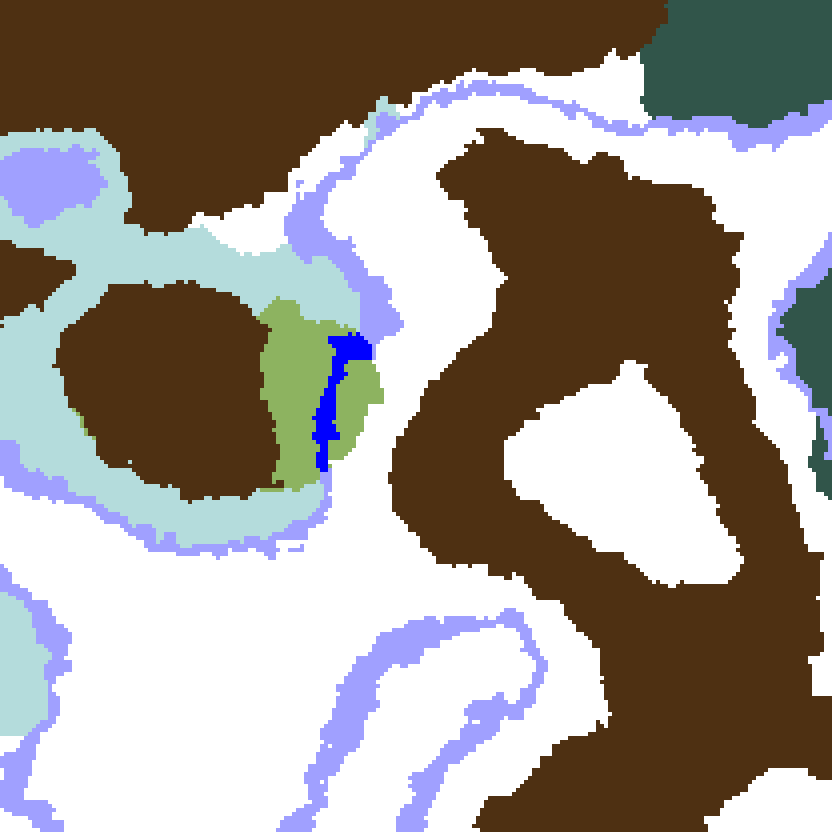
Biome map from our seed map engine (Java 1.21.4+), checked against the real world: spawn and structures match. Biomes are shown at sea level, so mountain biomes such as a cherry grove on a summit may look different here. Numbers match the coordinates table.
Why this seed
Cherry Grove Frozen Frontier is a Minecraft world (-3016229750297080274) where Java players spawn on flat snowy plains at 176, 66, 128, 118 blocks from the edge of a pink cherry grove that sits alone among ice spikes, frozen rivers and snow. Every coordinate on this page was checked in a Java 26.3 world generated from this number: the spawn, five structures and the biome borders.
Cherry Grove Frozen Frontier: a Cherry Grove Inside a Frozen Landscape
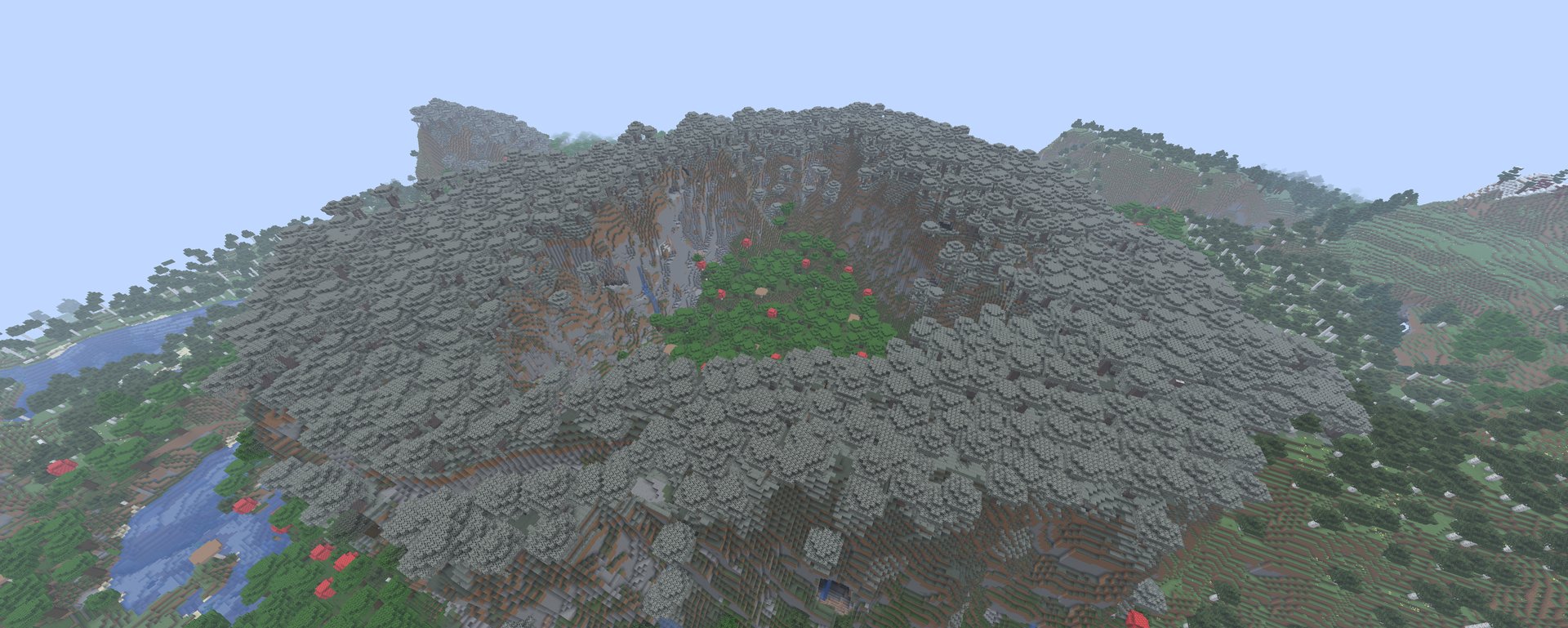
The cherry grove in Cherry Grove Frozen Frontier covers roughly 190 × 150 blocks, from -120 to 72 on X and from -64 to 88 on Z, with its nearest edge at 72, 100, 72 north-west of spawn. Around it Cherry Grove Frozen Frontier wraps cold biomes on every side:
- Ice spikes — the first spires stand at
120, 67, 128, only 56 blocks west of spawn, and the biome borders the cherry grove on the north and west. - Frozen river — a frozen river runs 48 blocks west of spawn and curves around the cherry grove.
- Snowy plains — the flat white ground of the spawn itself, stretching east and south to the village and the outpost.
- Snowy taiga — spruce forest further out to the south-east, about 350 blocks from spawn.
Within 512 blocks of spawn Cherry Grove Frozen Frontier is about 64% snowy plains, 15% ice spikes and only 2% cherry grove — the pink patch is the single warm spot in a white map.
Cherry Grove Frozen Frontier: Five Structures Within 400 Blocks of Spawn
All five structures below were found in the generated Java 26.3 world, not estimated:
- Snowy village at
368, 69, 128— 192 blocks east of spawn; its houses and farms spread from about306to419on X. The first trading hub of Cherry Grove Frozen Frontier. - Ruined portal at
371, 71, 212— buried about 30 blocks under the snowy surface just south of the village. Dig down for the obsidian, gold blocks and loot chest. - Pillager outpost at
128, 71, 352— 229 blocks south of spawn on snowy plains. The captain drops an Ominous Bottle in Java 1.21 and later (Bad Omen directly in 1.20), and outposts may hold caged allays. - Igloo at
83, 91, -249— about 390 blocks north. In Cherry Grove Frozen Frontier this igloo is surface-only, with no basement laboratory. - Mineshafts — corridors run at Y −18 to 23 between
249and404on X and252and418on Z, under the land between the village and the outpost.
Cherry Grove Frozen Frontier: Java 1.20–26.3 and Bedrock Compatibility
Cherry Grove Frozen Frontier needs the cherry grove biome, added in Minecraft Java 1.20 and Bedrock 1.20. The spawn, biome borders and structure positions above were confirmed in Java 26.3, and the seed map engine places the same structures for Java 1.20 and 1.21, so any Java version from 1.20 on loads the same layout. On Bedrock the terrain and biomes match, but the spawn and structures land in different places — see the parity notes below.
Cherry Grove Frozen Frontier: Three-Day Survival Route
Day 1 — Snowy spawn and the cherry grove
Snow gives no wood, so walk 118 blocks north-west to the cherry grove first: cherry logs for tools, a crafting table and a bed before night. The grove is also the most sheltered base site in Cherry Grove Frozen Frontier.
Day 2 — Snowy village and the buried portal
Head 192 blocks east to the snowy village at 368, 69, 128 for food and trades, then dig to the buried ruined portal at 371, 71, 212 for obsidian and gold blocks.
Day 3 — Pillager outpost and igloo
Clear the pillager outpost at 128, 71, 352 once you have armour, then travel north to the igloo at 83, 91, -249. Mine down near the village to reach the mineshaft corridors for iron, coal and rails.
Cherry Grove Frozen Frontier: Why the Layout Stands Out
Cherry groves usually generate on mountain slopes next to meadows and forest. In Cherry Grove Frozen Frontier the cherry grove is the only warm biome within 512 blocks of spawn, closed in by ice spikes and frozen rivers, and five structures sit within 400 blocks — a pink island in a frozen map that builders and survival players can both use from the first day.
Main features
- Cherry grove within 600 blocks
- Ice spikes ring around spawn
- Pink island in a frozen world
- Snowy village within walking distance
- Ruined Nether portal near spawn
- Pillager outpost within walking distance
- Igloo near spawn
Coordinates of key locations
Biomes
Structures
Who this seed is for
Cherry Grove Frozen Frontier suits builders who want a pink cherry grove framed by snow and ice spikes, and survival players who like a flat snowy start with a village, ruined portal, pillager outpost and igloo all inside 400 blocks.
Differences between editions
On Bedrock, Cherry Grove Frozen Frontier keeps the same terrain and biomes — the cherry grove, ice spikes and snowy plains sit in the same places — but the spawn point and every structure generate elsewhere. Use the Java coordinates below as a guide to the area and confirm structures with `/locate structure village` or `/locate structure pillager_outpost`.

Quick guide
How to use a Minecraft seed
-
1
Copy the seed number
Click "Copy" in the block above. When you create the world, paste the number into the "Seed for the World Generator" field (Java Edition: "World" tab).
-
2
Match the edition and version
Use the listed edition (Java or Bedrock) and a version inside the supported range. Outside that range terrain may regenerate differently.
-
3
Travel to the coordinates
Use /tp x y z (operator only) or fly there in Creative. Coordinates can also be copied from the table below in one click.
Java and Bedrock share terrain on 1.18+ but place structures differently. The "Differences between editions" block on every seed page lists the exact deltas.
Frequently asked questions
What is a Minecraft seed?
A seed is a number that locks the world generator into producing a specific terrain, biome layout and structure placement. Two players using the same seed and version get the exact same world.
Where do I paste the seed?
On the "Create New World" screen in Java Edition open the "World" tab and paste the number into the "Seed for the World Generator" field. In Bedrock Edition scroll the world settings down to the seed field. Negative numbers work too.
Why does the world look different from the screenshot?
Most often the version is wrong: even minor 1.21.x differences can shift village positions or add new biomes. Match the version listed in the "Edition" block exactly.
Can I use a Java seed on Bedrock?
Only if the number fits the Bedrock 32-bit range. Even then structure placement and mob spawns will differ, so check the "Differences between editions" block.
Are coordinates always accurate?
Yes, for the listed edition and version. If you switch version or edition, structures may move by hundreds of blocks, though terrain stays roughly the same on 1.18 and later.
How do I report a wrong seed or coordinate?
Open the contact page from the footer and send us the link to the seed page and the coordinate that does not match. We re-verify and update within a few days.